
Binance ගිණුම් මාර්ගෝපදේශ
Binance 2FA සහ Account Security: Passkey, Phishing ආරක්ෂාව
Binance Security page එකෙන් passkey/TOTP, recovery, anti-phishing code, device review, withdrawal allowlist සහ incident response සම්පූර්ණ කරන Sinhala checklist එක.
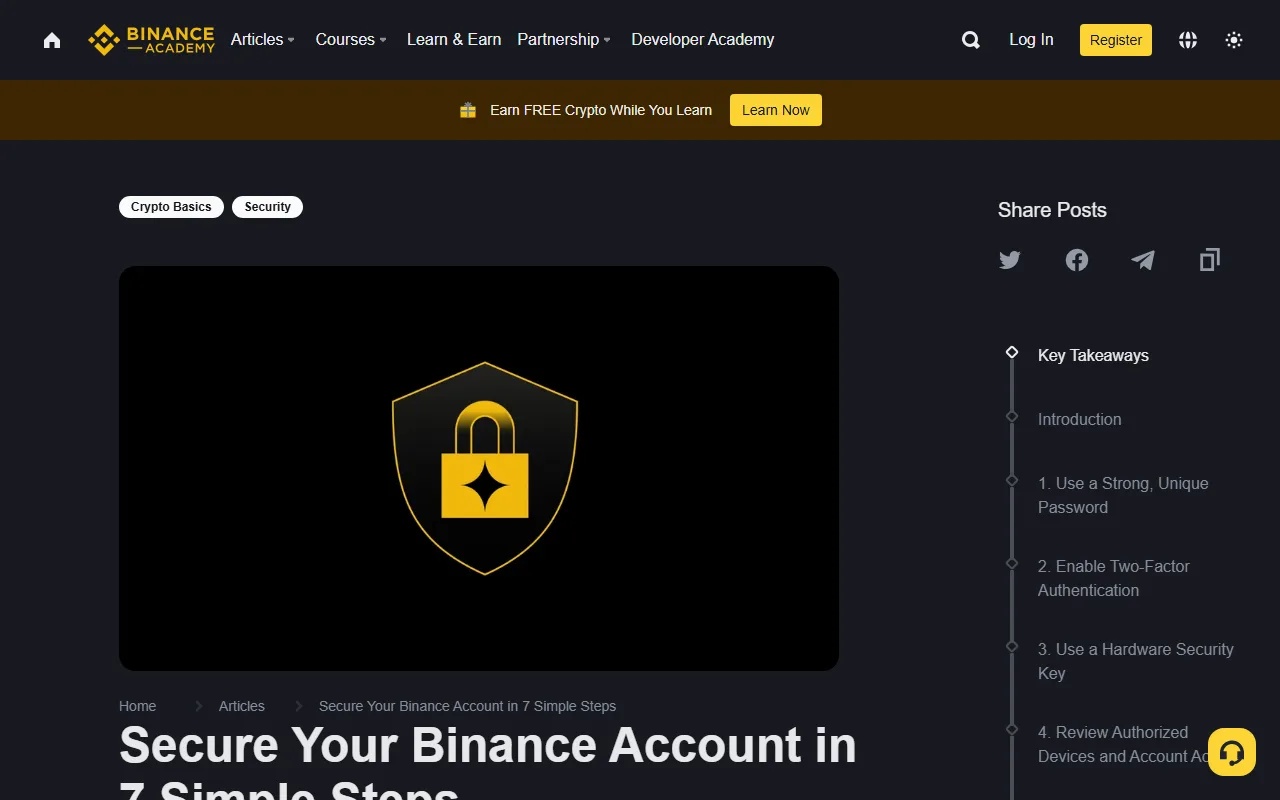
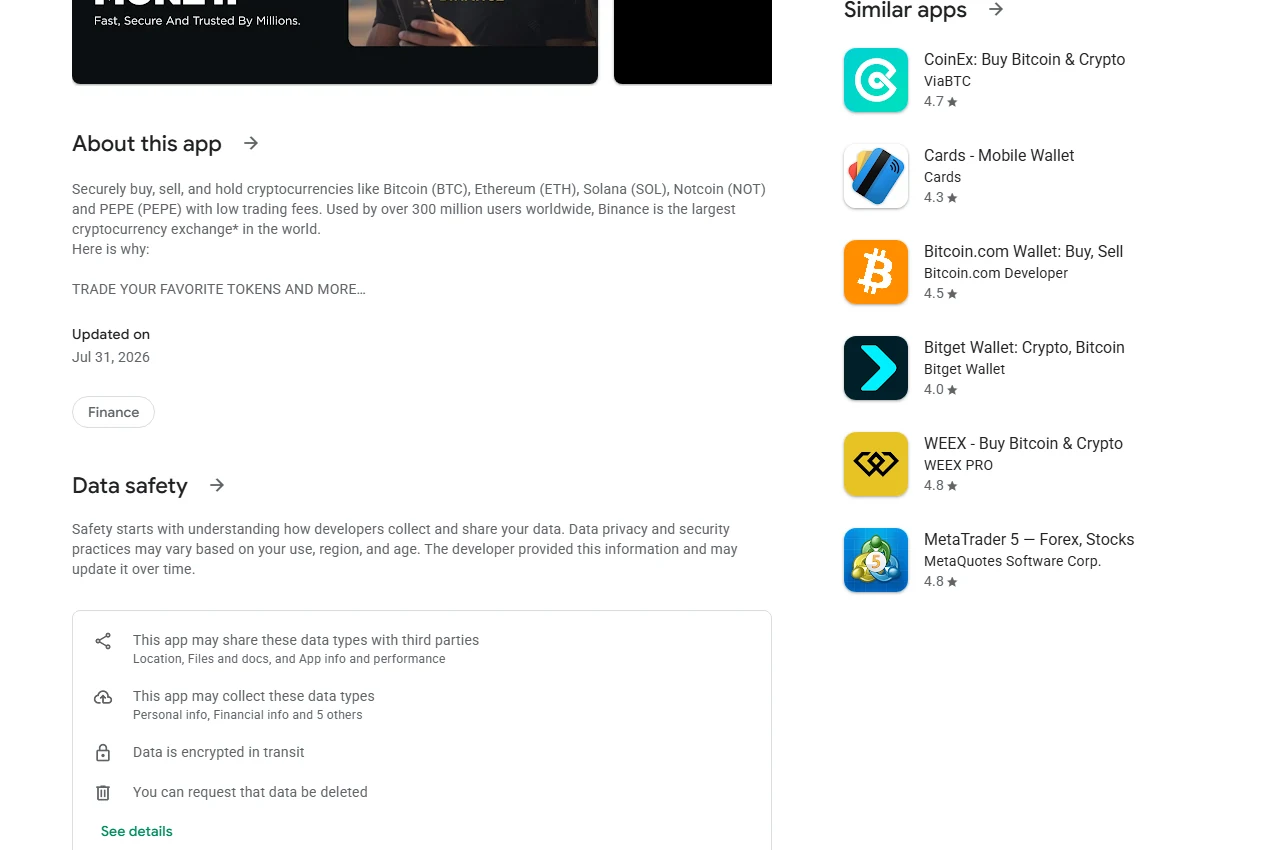
Binance account එකක් සෑදීමෙන් පසු පළමු කාර්යය trade කිරීම නොව login, email සහ withdrawal ආරක්ෂාව ස්ථර කිහිපයකින් සැකසීමයි. ඉහත screenshot එක Google Play හි Binance app listing එකේ Data safety කොටස පෙන්වයි. Publisher සහ data disclosure පරීක්ෂා කිරීමට එය එක් පියවරක් වුවත්, app එකේ සියලු security controls independently audit කළ බවක් එයින් අදහස් නොවේ.
මෙම guide එකේ menu names කාලයත් සමඟ වෙනස් විය හැක. Security setting එකක් සක්රීය කරන විට ඔබේ live account එකේ description සහ confirmation message කියවන්න. Password, OTP, passkey, recovery key, API secret හෝ screen-sharing access කිසිවෙකුට නොදෙන්න.
මුදල් දැමීමට පෙර security setup order
Official app/site එක අතින් විවෘත කර Profile → Account → Security යන්න. Menu name වෙනස් නම් search ad හෝ email link එකක් භාවිතා නොකර account settings තුළ Security සොයන්න. පහත order එකෙන් කරන්න:
- Email account එක සහ Binance account එක සඳහා වෙන වෙනම unique passwords තබන්න.
- Passkey/security key ලබාදේ නම් primary phishing-resistant factor එකක් සකසා, නැත්නම් authenticator app TOTP සක්රීය කරන්න.
- Backup factor/recovery key එක account එකෙන් වෙනම offline ස්ථානයක තබන්න.
- Anti-phishing code එකක් සකසා, genuine notification email එකක එය පෙන්වෙනවාද බලන්න.
- Device Management/Account Activity තුළ devices සහ IP activity ඔබේ ඒවාද පරීක්ෂා කරන්න.
- Withdrawal address allowlist ලබාදේ නම් ඔබ පාලනය කරන test address එකකින් workflow එක තහවුරු කරන්න.
- API keys අවශ්ය නොවේ නම් zero keys බව පරීක්ෂා කරන්න; අවශ්ය නම් minimum permissions සහ IP restriction යොදන්න.
Done definition: Security page එකේ factor එක On/Enabled ලෙස පෙන්විය යුතුය, backup/recovery ක්රමය ඔබට ලැබී තිබිය යුතුය, හඳුනා නොගත් session/API key එකක් නොතිබිය යුතුය සහ anti-phishing code එක live email එකකින් verify කළ යුතුය. Secret, OTP හෝ recovery key screenshot නොකරන්න.
එක් එක් control සම්පූර්ණ වූයේද යන්න පරීක්ෂා කරන්න
Passkey / authenticator
- Path සහ action: Profile → Account → Security → 2FA/Manage; live prompts අනුව bind කර confirmation එක සම්පූර්ණ කරන්න.
- Complete: Method එක On/Enabled සහ independent backup factor එකක් තිබිය යුතුය.
- Recovery: Device එක නැති වුවහොත් saved recovery method හෝ official account recovery පමණක් භාවිතා කරන්න.
Anti-phishing code
- Path සහ action: Account → Security → Anti-Phishing Code; password නොවන unique phrase එකක් set කරන්න.
- Complete: New genuine Binance email එකේ exact code එක පෙන්විය යුතුය.
- Recovery: Code එක missing/wrong නම් email link click නොකර official app/site අතින් විවෘත කරන්න.
Devices and activity
- Path සහ action: Security → Device and Activities; device, IP/region සහ time review කර unknown sessions remove කරන්න.
- Complete: Known active devices පමණක් ඉතිරි විය යුතුය.
- Recovery: Unknown activity නම් disable/freeze flow සහ පහත incident order භාවිතා කරන්න.
Withdrawal allowlist
- Path සහ action: Security/Address Management; ඔබ පාලනය කරන address, network සහ memo/tag verify කර allowlist enable කරන්න.
- Complete: Known addresses පමණක් ඉතිරි වී current confirmation/cooling rule එක ඔබට තේරිය යුතුය.
- Recovery: Email compromise සැක නම් address add නොකර email account එක මුලින් secure කරන්න.
API keys
- Path සහ action: Account → API Management; අනවශ්ය keys delete කර අවශ්ය key එකට minimum permission සහ IP restriction යොදන්න.
- Complete: Zero keys හෝ known restricted keys පමණක් තිබිය යුතුය.
- Recovery: Secret leak හෝ unknown key එකක් තිබේ නම් වහා revoke කර official support contact කරන්න.
Menu labels region සහ update අනුව වෙනස් විය හැක. Exact label එක නොපෙනේ නම් current Security page/search එක භාවිතා කරන්න; third-party tutorial link එකකින් credentials ඇතුළත් නොකරන්න.
1. Account එකට වෙනම email සහ password එකක්
වෙනත් site එකක නැවත භාවිතා නොකරන දිග, unique password එකක් trusted password manager එකක තබන්න. Password එක chat, note screenshot හෝ cloud photo එකක ගබඩා නොකරන්න. Password එක leaked වී ඇතැයි සැකයක් තිබේ නම් clean device එකකින් වෙනස් කරන්න. 2026-06-26 යාවත්කාලීන කළ official Binance guide එක අනුව password වෙනස් කිරීමෙන් පසු withdrawals පැය 24කට suspend වේ; live confirmation එකේ current restriction එක කියවා emergency plan එකට එය ඇතුළත් කරන්න.
Binance account recovery සහ security alerts email එක මත රඳා සිටිය හැකි නිසා email account එකටත් unique password සහ phishing-resistant 2FA සක්රීය කරන්න. Exchange account එක ශක්තිමත් වුවත් email එක අත්පත් වුවහොත් password reset සහ withdrawal-address confirmation අවදානම් විය හැක.
2. 2FA method එක තෝරන්න
SMS 2FA කිසිවක් නැතිව සිටීමට වඩා හොඳ විය හැකි නමුත් SIM-swap අවදානමක් ඇත. Authenticator app එකක් time-based one-time codes generate කරන නිසා mobile number එක පමණක් අත්පත් කරගත් attacker කෙනෙකුට ප්රමාණවත් නොවේ. TOTP recovery key එක offline සහ encrypted හෝ භෞතිකව ආරක්ෂිත ස්ථානයක තබන්න.
Passkey හෝ hardware security key option ලබාදේ නම් phishing resistance වැඩි කරන factor එකක් ලෙස සලකා බලන්න. Backup factor එකක් නැතිව single device එකකට පමණක් රඳා නොසිටින්න. Backup method එක set කර ඇති බව පරීක්ෂා කරන්න, නමුත් login credentials හෝ private recovery material cloud screenshot එකක් ලෙස නොතබන්න.
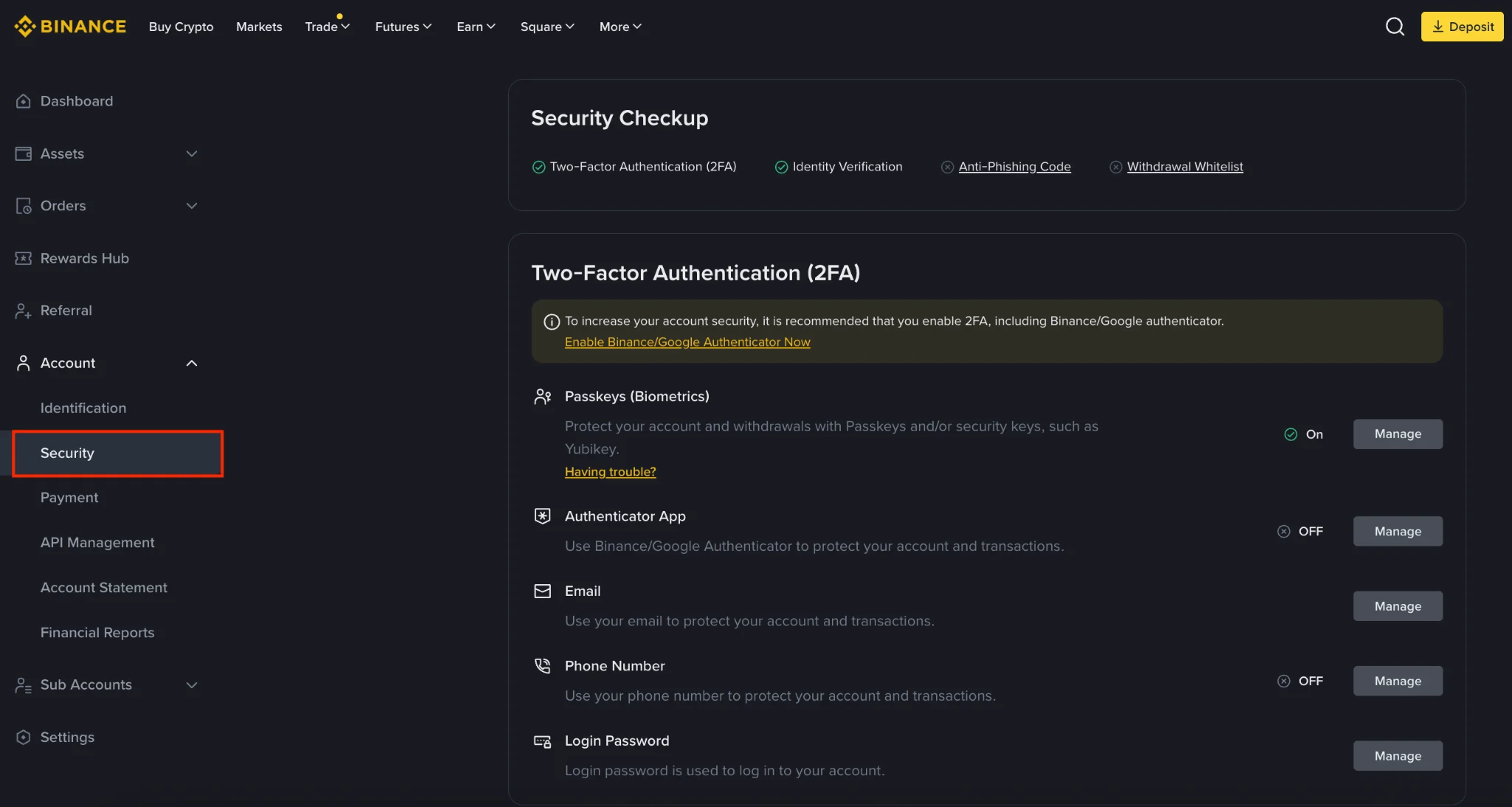
මෙම screenshot එක 2026-08-27 දින official Binance Academy security guide තුළ පෙන්වූ Security settings interface එකේ සැබෑ webpage capture එකයි. Menu layout, method names සහ ලබාගත හැකි controls කාලයත් සමඟ වෙනස් විය හැකි බැවින් ඔබේ current Security settings පිටුවේ විස්තර කියවන්න.
2FA method එකක් තෝරන්න: වාසි සහ backup අවශ්යතා
Passkey හෝ hardware security key
- වාසිය: Fake domain එකකට code type නොකරන phishing-resistant flow එකක් ලබාදේ.
- Backup අවශ්යතාව: Device/key එක නැති වුවහොත් භාවිතා කිරීමට වෙනම independent factor එකක් තබන්න.
Authenticator app (TOTP)
- වාසිය: Phone number එක පමණක් hijack කිරීමෙන් code එක ලබාගත නොහැක.
- Backup අවශ්යතාව: Recovery key එක offline තබා device-loss recovery plan එක කලින් තහවුරු කරන්න.
SMS
- වාසිය: Setup පහසු වන අතර no-2FA ට වඩා හොඳය.
- සීමාව: SIM-swap සහ mobile-number recovery අවදානම් නිසා එකම factor එක ලෙස නොතබන්න.
ඔබේ live account එක passkey සහ authenticator දෙකම ලබාදේ නම්, එක factor එක fail වූ විට recovery path එකක් තිබෙන ලෙස independent methods දෙකක් සලකා බලන්න. එකම phone එකේ screenshot කළ recovery secret එක “independent backup” එකක් නොවේ.
3. Recovery plan එක කලින් සකස් කරන්න
Phone එක නැති වීම, authenticator app reset වීම හෝ hardware key එක අහිමි වීම login emergency එකක් විය හැක. Account එකට මුදල් දැමීමට පෙර backup factor, recovery key location සහ account-recovery process එක ඔබට තේරෙනවාද පරීක්ෂා කරන්න.
Recovery key හෝ backup code එක test කරන විට එය වෙනත් පුද්ගලයෙකුට නොපෙන්වන්න. Support ලෙස පෙනී සිටින කෙනෙකු recovery code, remote-control access හෝ video verification පිටත channel එකක ඉල්ලන්නේ නම් process එක නවතා දමන්න.
4. Anti-phishing code සකසන්න
Anti-phishing code යනු ඔබම තෝරන phrase එකක් වන අතර genuine Binance notification emails තුළ එය පෙන්විය හැක. Code එක ඔබේ password එක නොවිය යුතු අතර public nickname එකක් වැනි පහසුවෙන් අනුමාන කළ හැකි වචනයක් නොවීම හොඳය.
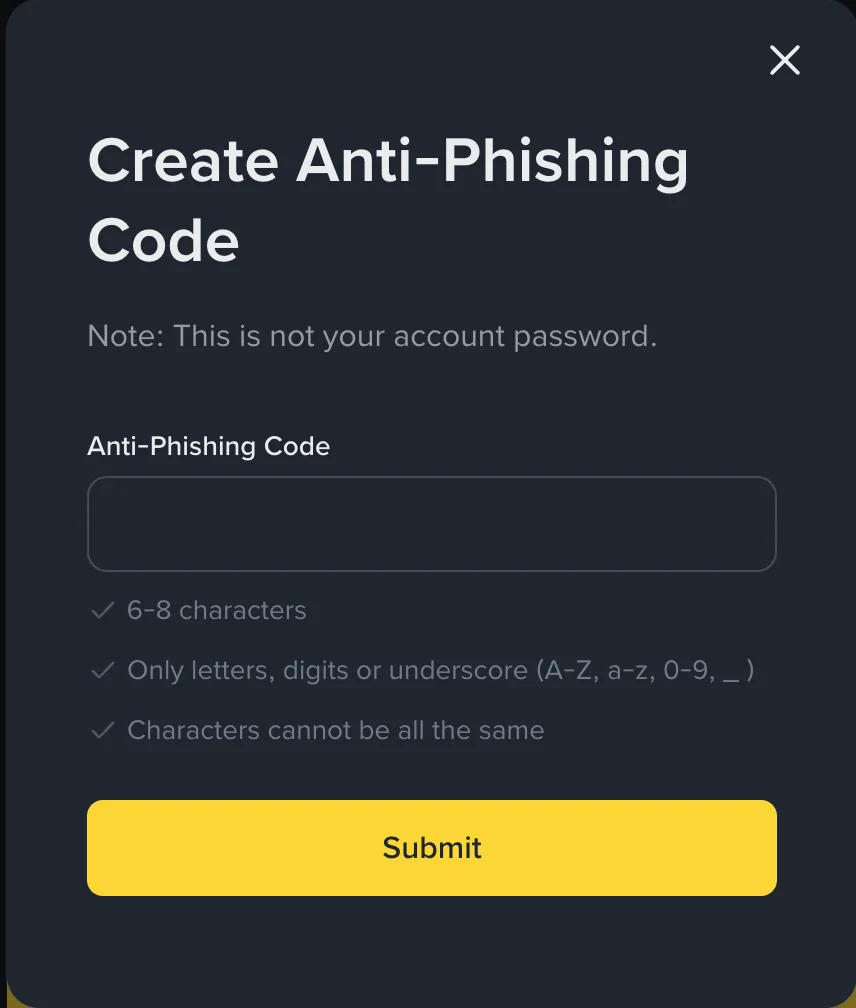
Email එකක code එක නොමැති හෝ වැරදි නම් එහි button හෝ link click නොකරන්න. Code එක නිවැරදි වුවත් sender account compromise හෝ copied email අවදානම සම්පූර්ණයෙන් ඉවත් නොවන නිසා sensitive action එක saved app/site entry එකෙන් ආරම්භ කරන්න. Anti-phishing code එක එක් signal එකක් මිස single proof එකක් නොවේ.
5. Devices, IP activity සහ sessions පරීක්ෂා කරන්න
Security settings හි authorized devices සහ recent account activity බලන්න. Device name, operating system, IP/region සහ login time ඔබේ activity සමඟ ගැළපේද පරීක්ෂා කරන්න. VPN හෝ mobile network නිසා region වෙනස් පෙනිය හැකි නමුත් හඳුනා නොගත් device එක ignore නොකරන්න.
පැරණි phone, shared computer හෝ භාවිතා නොකරන browser sessions revoke කරන්න. Public computer එකක login නොකරන්න. Browser extension සහ remote-access software account sessions හෝ clipboard data ලබාගත හැකි නිසා trading device එකේ අවශ්ය නොවන extensions ඉවත් කරන්න.
6. Withdrawal address allowlist භාවිතා කරන්න
Withdrawal address allowlist හෝ whitelist ලබාදේ නම්, ඔබ විශ්වාස කරන wallet addresses පමණක් pre-approve කිරීමට එය භාවිතා කළ හැක. New address එකක් add කරන විට email confirmation හෝ cooling period තිබිය හැක. Feature එකේ current rules live interface එකෙන් කියවන්න.
Allowlist එක email security මතද රඳා සිටිය හැකි නිසා email account එක දුර්වල නම් protection එක අඩුවේ. Address එක copy/paste කළ පසු මුල් සහ අවසාන characters කිහිපයක් පමණක් නොව network, memo/tag requirement සහ test amount එකත් පරීක්ෂා කරන්න. Malware clipboard address වෙනස් කළ හැක.
7. API key අවශ්ය නැත්නම් සාදන්න එපා
API key එක account access credential එකකි. Third-party bot හෝ portfolio service එකක් සම්බන්ධ කිරීමට පෙර අවශ්ය permissions මොනවාද කියා බලන්න. Read-only access ප්රමාණවත් නම් trading හෝ withdrawal permissions ලබා නොදෙන්න.
IP restriction ලබාදේ නම් known server IPs පමණක් allow කරන්න. API key සහ secret source code, public repository, screenshot, chat හෝ browser note එකක දමන්න එපා. Service එක භාවිතා නොකරන විට key revoke කරන්න; suspicious activity එකකදී සියලු keys review කිරීම emergency checklist එකේ තබන්න.
8. App සහ login page සත්යාපනය කරන්න
App store එකේ publisher name, install source, reviews පමණක් නොව permissions සහ update history බලන්න. Search advertisement එකකින් login page එකකට නොගොස් saved entry එකක් හෝ already installed app එක භාවිතා කරන්න. Password manager එක expected site එකේ පමණක් autofill නොකරනවා නම් domain mismatch එකක් ගැන warning signal එකක් විය හැක.
Browser URL bar එකේ spelling සහ connection status බලන්න. Secure-looking logo, padlock image හෝ cloned page design එකක් ownership proof එකක් නොවේ. QR code එකක් scan කිරීමට පෙර එය login, wallet connect හෝ withdrawal request එකක්ද කියවන්න.
9. Support impersonation හඳුනාගන්න
Scammer කෙනෙකු account freeze, KYC failure, withdrawal problem හෝ “safe wallet” කතාවක් භාවිතා කර urgency නිර්මාණය කළ හැක. මෙම requests red flags වේ:
- private message එකකින් seed phrase, OTP හෝ recovery key ඉල්ලීම
- remote-control හෝ screen-sharing app install කිරීමට කියීම
- funds “verification wallet” එකකට යැවීමට කියීම
- withdrawal unlock fee එකක් private wallet එකකට ඉල්ලීම
- guaranteed recovery හෝ guaranteed profit පොරොන්දුව
Support conversation එකක් සැක සහිත නම් reply කිරීම නවතා account interface එකෙන් support channel එක නැවත ආරම්භ කරන්න. Scammer ට transaction screenshots යවන විට email, UID, balances සහ address history වැනි තොරතුරු leak විය හැක.
10. Withdrawal කිරීමට පෙර checklist එක
- Asset සහ network දෙක receiving wallet එක support කරනවාද?
- Address, memo/tag සහ chain එක නිවැරදිද?
- Clipboard paste පසු address එක වෙනස් වී නැද්ද?
- Large amount එකකට පෙර small test transfer එකක් කළාද?
- Fee සහ minimum withdrawal amount කියවුවාද?
- Device එක malware හෝ remote session එකකින් තොරද?
Crypto transfers බොහෝවිට ආපසු හැරවිය නොහැකි නිසා confirm button එකට පෙර pause එකක් තබන්න. Video call හෝ chat pressure අතර withdrawal නොකරන්න.
සැක සහිත login එකක් ලැබුණොත්
Active compromise එකකදී පරීක්ෂා කිරීම නැවත නැවත කරමින් delay නොවී මෙම එකම containment order එක භාවිතා කරන්න:
- Clean, trusted device එකකින් official app/site අතින් විවෘත කරන්න. Email, SMS, search ad හෝ private-message link භාවිතා නොකරන්න.
- Unauthorized login, order, withdrawal-address change හෝ API activity පෙනේ නම් available Disable Account/Freeze control එක වහා භාවිතා කරන්න. Confirm කිරීමට පෙර live warning කියවන්න. 2026-08-27 දින පරීක්ෂා කළ Binance නිල security guide අනුව disable කිරීම trading සහ withdrawals suspend කර, API keys ඉවත් කර authorized devices clear කළ හැක.
- Linked email account එක මුලින් secure කරන්න. Email password එක clean device එකෙන් වෙනස් කර phishing-resistant 2FA/recovery options review කරන්න; attacker email එක පාලනය කරන්නේ නම් Binance resets නැවත අත්පත් කරගත හැක.
- Binance credentials සහ recovery factors reset කරන්න. Unique password, passkey/TOTP, backup factors සහ anti-phishing code review කරන්න. Official guide අනුව Binance password වෙනස් කිරීමෙන් පසු withdrawals පැය 24කට suspend වේ; live confirmation එකේ current restriction එක කියවන්න.
- Devices, API keys, withdrawal addresses සහ orders සම්පූර්ණයෙන් audit කරන්න. Unknown item එකක් ඉතිරි නම් re-enable හෝ deposit නොකරන්න.
- Official account interface එකෙන් support contact කර evidence තබන්න. Timestamps, transaction IDs සහ screenshots සංරක්ෂණය කර share කිරීමට පෙර email, phone, UID, balances, QR codes, tokens සහ internal URLs mask කරන්න.
Login වීමට නොහැකි නම් inbound “support” message එකකට reply නොකර official account-recovery/Support entry එක අතින් විවෘත කරන්න. Recovery code, remote-control access හෝ funds “safe wallet” එකකට යැවීම කිසිවෙකුට ලබා නොදෙන්න. Unexpected withdrawal එකක් blockchain එකේ reverse වන බවට guarantee නැති නිසා private recovery service එකකට මුදල් නොදෙන්න.
Incident complete definition: linked email නැවත ආරක්ෂිතය; unknown sessions සහ API keys zero ය; withdrawal addresses/orders review කර ඇත; password සහ factors reset කර ඇත; official support case/evidence record එක තබා ඇත; live account warning අනුව re-enable කිරීමේ බලපෑම ඔබට තේරේ. මෙම conditions සම්පූර්ණ නොවන්නේ නම් account එකට නැවත funds දමන්න එපා.
මාසික security review එක
මාසයකට වරක් හෝ sensitive change එකකට පසු මෙම items review කරන්න:
- authorized devices සහ login activity
- 2FA/passkey සහ backup factor status
- email security සහ recovery options
- withdrawal allowlist
- API keys සහ permissions
- installed browser extensions සහ apps
- anti-phishing code email එකක නිවැරදිව පෙනෙනවාද
Security review එක credentials display කිරීමක් නොවේ. Recovery phrase හෝ OTP screenshot කර “backup test” නොකරන්න. Control එකක් තවම ක්රියා කරනවාද verify කරන අතර secret material හෙළි නොකිරීමයි අරමුණ.
නිල හා ප්රාථමික මූලාශ්ර: Binance Academy — Secure Your Binance Account (updated 2026-06-26), Binance — Account security video, Binance Academy — Common Scams, CBSL warning. මෙය ආරක්ෂක අධ්යාපනය පමණි. Menu names, available controls සහ regional access වෙනස් විය හැකි බැවින් live interface එකේ current instructions කියවන්න.