Binance ගිණුම් මාර්ගෝපදේශ
Create Binance Account Sri Lanka: සිංහල පියවර සහ KYC
Binance නිල invitation registration link එකෙන් account creation, email/phone verification, KYC fields, document/liveness checks සහ failure handling සම්පූර්ණ කරන Sinhala guide එක.
වැදගත්: ශ්රී ලංකා මහ බැංකුව (CBSL) අනුව cryptocurrency ශ්රී ලංකාවේ නීත්යානුකූල මුදල් නොවන අතර නියාමන ආරක්ෂාවක් නොමැත. CBSL දක්වා ඇති විදේශ විනිමය සහ කාඩ්පත් සීමාද අදාළ වේ. සේවාව ඔබේ ප්රදේශයට ලබාදෙනවාද සහ වත්මන් නීතිය කුමක්ද යන්න ලියාපදිංචියට පෙර නිල මූලාශ්රවලින් පරීක්ෂා කරන්න. VPN, ව්යාජ ලිපිනය හෝ ගෙවීම් සීමා මගහැරීමට මෙම මාර්ගෝපදේශය උපදෙස් නොදෙයි.
මෙම guide එකෙන් තහවුරු කළ හැකි දේ
මෙම පියවරෙන් public registration form එක විවෘත කිරීම, email/phone verification කිරීම සහ live KYC workflow එක සම්පූර්ණ කිරීම තේරුම් ගත හැක. එහෙත් ලිපියක් මගින් Sri Lanka residence එක පිළිගන්නා බව, විශේෂ product එකක් ලබාදෙන බව හෝ payment method එකක් නීත්යානුකූල බව පෙර තහවුරු කළ නොහැක. ඒවා live residence selector, current terms සහ CBSL නවතම නිවේදන තුනෙන් පරීක්ෂා කළ යුතුය.
ආරම්භ කිරීමට පෙර ඔබටම අයිති recover කළ හැකි email/phone එකක්, unique password එකක්, live flow එක පිළිගන්නා ඔබේම original government ID එකක් සහ camera සහිත clean device එකක් සූදානම් කරගන්න. Live Terms හි age/legal-capacity eligibility, privacy notice සහ document handling කියවා ඔබට අදාළ බව තහවුරු කරන්න; අගයක් හෝ eligibility rule එකක් මෙම ලිපියෙන් අනුමාන නොකරන්න. Shared computer, borrowed document හෝ remote-control session එකක් භාවිතා නොකරන්න.
1. Binance නිල invitation link එකෙන් registration ආරම්භ කරන්න
මෙම Binance නිල invitation registration link එක Binance හි official registration page එකට යොමු කරයි. Link එක විවෘත කළ පසු live page එකේ පෙන්වන country eligibility, terms සහ privacy agreement කියවා ඉදිරියට යන්න. Telegram/WhatsApp message, search ad හෝ අහඹු QR code එකකින් account details ඇතුළත් නොකරන්න.
Binance app එක භාවිතා කිරීමට අවශ්ය නම් device එකේ official app-store listing එකෙන් publisher name කියවා app එක install කරන්න. මෙම ලිපියේ නිල invitation link එක හෝ Binance app එක භාවිතා කර registration ආරම්භ කළ හැක.
ප්රවර්ධන අනාවරණය: සුදුසුකම් ලත් account/activity එකක් මෙම link එකට සම්බන්ධ වුවහොත් අපට commission ලැබිය හැක. Discount, reward, eligibility සහ available services region, campaign terms සහ account type අනුව වෙනස් වේ. Registration page එකේ ඔබට සෘජුව පෙන්වන terms තහවුරු නොවන්නේ නම් කිසිදු fixed discount එකක් ලැබෙන බව අනුමාන නොකරන්න.
2. Email හෝ phone number එකෙන් account එක සෑදීම
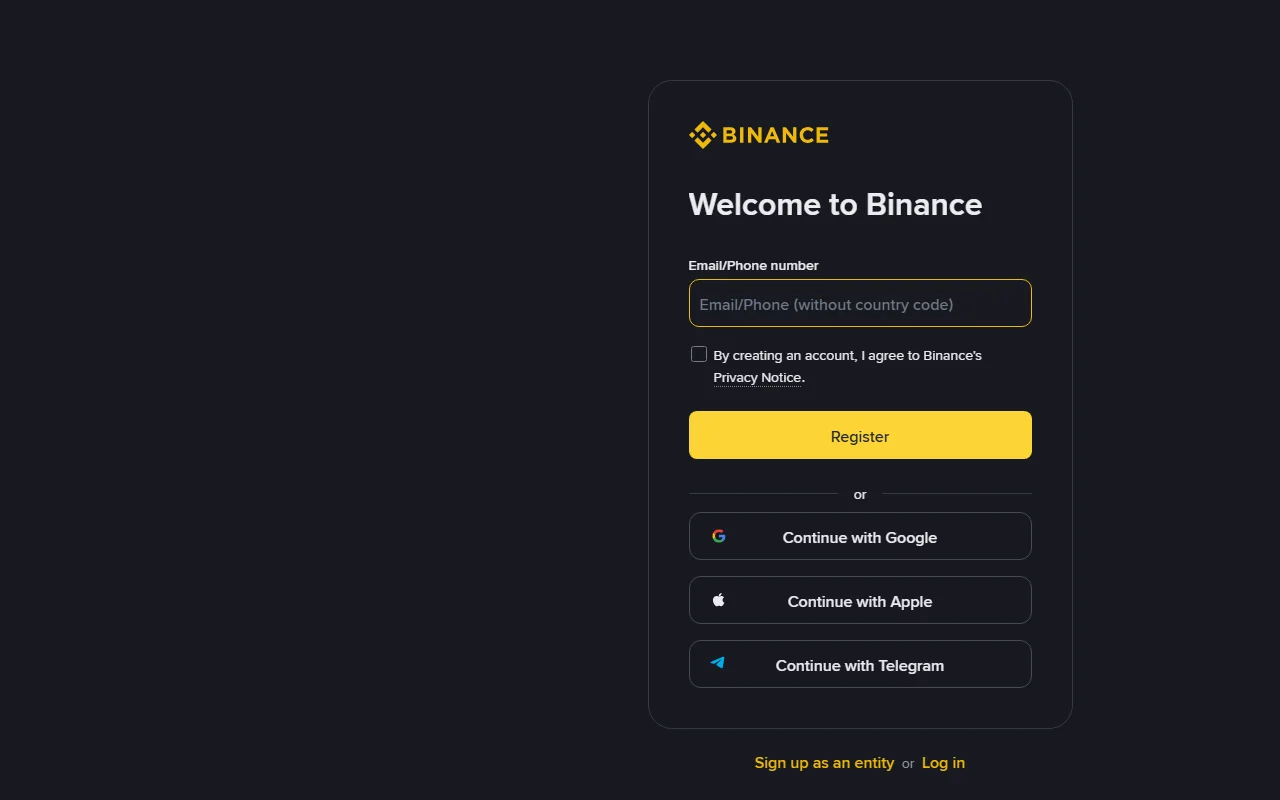
- Official registration page එකේ Email/Phone number field එක තෝරන්න.
- ඔබටම අයිති සහ නැවත ලබාගත හැකි email address එකක් හෝ phone number එකක් භාවිතා කරන්න.
- Privacy Notice සහ live page එකේ පෙන්වන terms කියවා එකඟ වන්නේ නම් පමණක් checkbox එක තෝරා Register/Continue කරන්න.
- Binance එවන verification code එක official page/app එකේ පමණක් ඇතුළත් කරන්න. OTP එක support agent කෙනෙකුටවත් නොදෙන්න.
- Live flow එක ඉල්ලන විට වෙනත් site එකක භාවිතා නොකරන දිගු, unique password එකක් තෝරා password manager එකක තබන්න.
මෙම screenshot එක 2026-08-27 දින Binance නිල invitation registration page එකෙන් ලබාගත් සැබෑ capture එකකි. Interface order එක වෙනස් විය හැකි නිසා live page එකේ labels කියවන්න; screenshot එකේ නොපෙන්වන field එකක් අනුමාන කර පුරවන්න එපා.
Registration complete ද කියා පරීක්ෂා කිරීම: confirmation email/SMS එක ලැබුණු පසු මෙම ලිපියේ Binance නිල invitation link එකෙන් හෝ Binance app එකෙන් login වන්න. Account dashboard එක විවෘත වීම basic registration සම්පූර්ණ බව පෙන්වයි; එය KYC complete හෝ Sri Lanka හි සියලු products eligible බව අදහස් නොකරයි.
3. Identity Verification (KYC) පියවර
KYC ආරම්භ කිරීමට පෙර live account එකේ Residence, Document Issuing Country/Region සහ available document types බලන්න. Sri Lanka හෝ ඔබේ සැබෑ residence එක option එකක් ලෙස නොපෙන්වන්නේ නම් process එක නවත්වන්න. VPN, වෙනත් රටක ලිපිනයක් හෝ වෙනත් අයෙකුගේ document භාවිතා නොකරන්න.
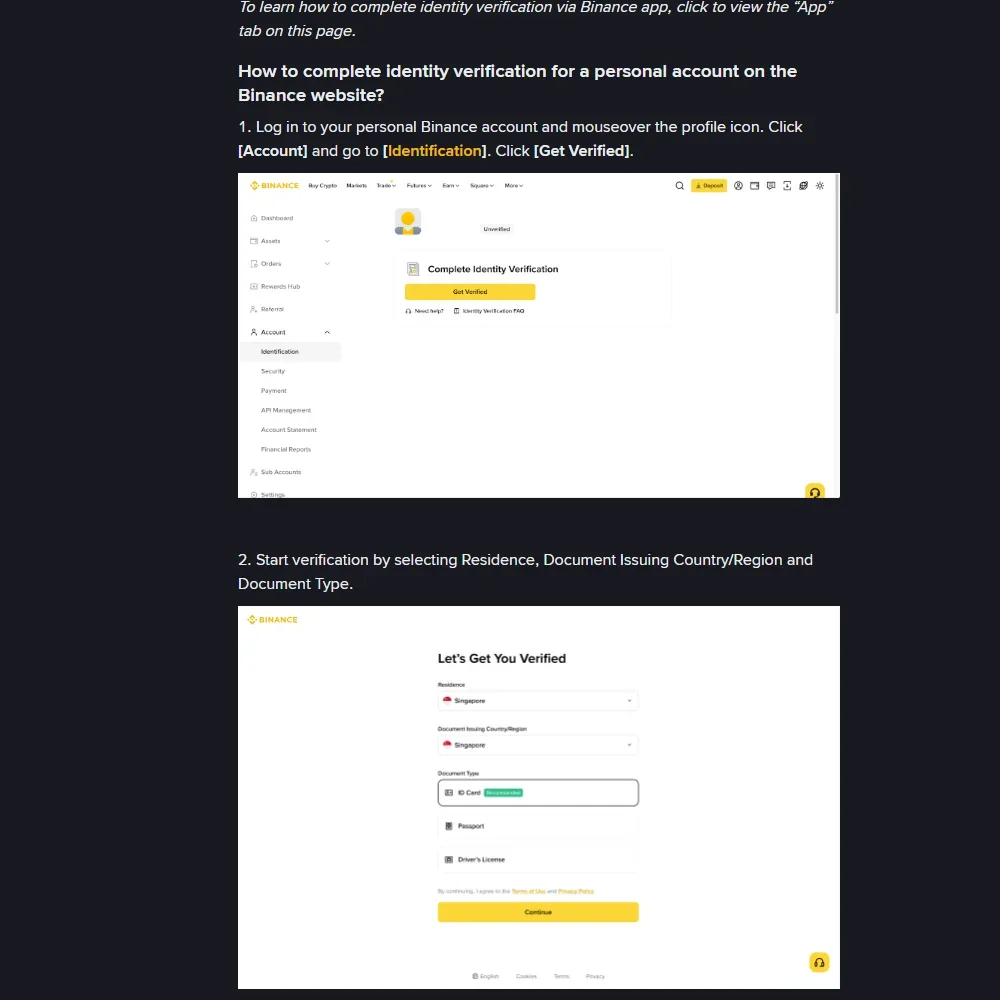
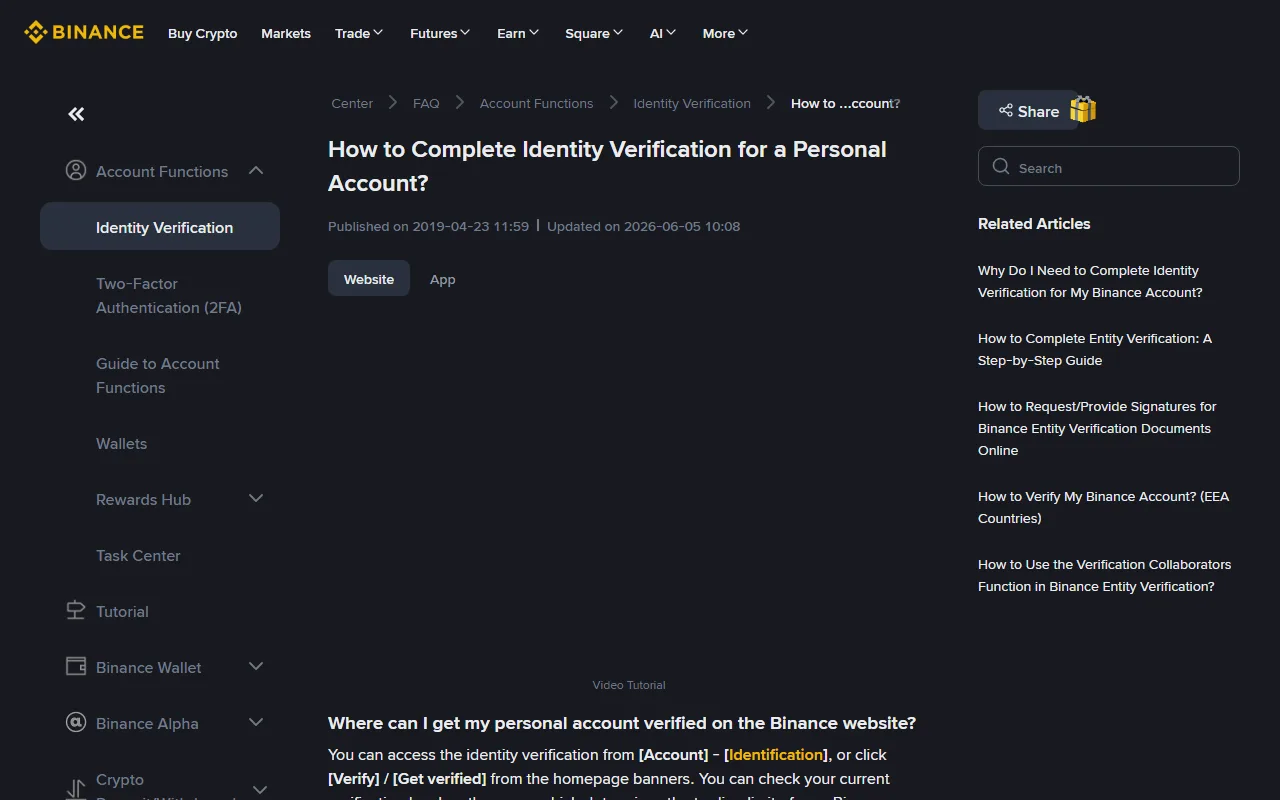
Screenshot එකේ Singapore යනු official help-page example එකක් පමණි; එය Sri Lanka eligibility තහවුරු කිරීමක් නොවේ.
- Login වූ පසු User Center/Profile → Identification යන්න; live page එකේ Start Now හෝ Get Verified label එක තෝරන්න.
- ඔබේ සැබෑ residence, document issuing country/region සහ live page එක පිළිගන්නා document type එක තෝරන්න.
- Current device එකෙන් document upload කරන්න, හෝ official page එක පෙන්වන QR flow එකෙන් ඔබේ phone එකට මාරු වන්න. QR code එක social message එකකින් නොගන්න.
- ID එකේ ඉල්ලන පැති සියල්ල frame එක තුළ, glare/blur නැතිව upload කරන්න. Screenshot, scan edit, filter හෝ cropped copy භාවිතා නොකර live instructions අනුගමනය කරන්න.
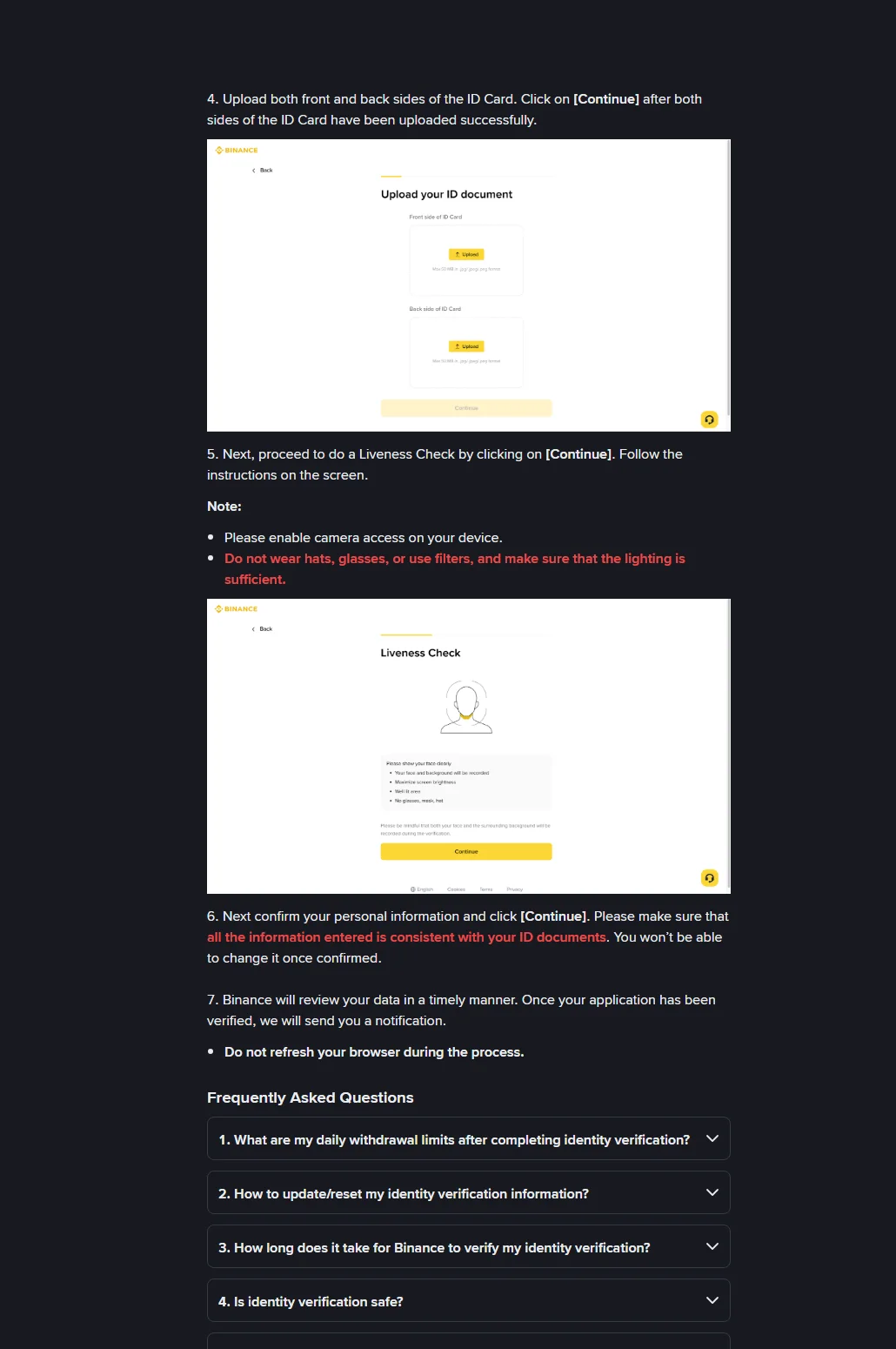
- Camera permission ලබාදී liveness check එක කරන්න. මුහුණ සම්පූර්ණයෙන් පෙනෙන, ප්රමාණවත් ආලෝකය ඇති තැනක් භාවිතා කරන්න; hat, dark glasses හෝ beauty filter භාවිතා නොකරන්න.
- නම, උපන් දිනය, residence සහ document data original document එකට ගැළපෙනවාද confirmation කිරීමට පෙර අක්ෂරෙන් අක්ෂරය බලන්න.
- Submit කළ පසු browser/app එක වසා නැවත නැවත submission නොකර Identification status සහ official notification එක පරීක්ෂා කරන්න.
මෙම screenshots 2026-08-27 දින Binance නිල “How to Complete Identity Verification” help page එකෙන් ලබාගත් සැබෑ webpage captures වේ. Locale අනුව page date label වෙනස් විය හැකි නිසා exact update date එකක් මෙම රූපවලින් අනුමාන නොකරන්න; country-specific requirements සඳහා live account එකේ current instructions භාවිතා කරන්න.
KYC submit කිරීමට පෙර mobile-friendly check
Residence
- Check: ඔබ සැබෑවට වාසය කරන රට live selector එකේද?
- Mismatch: වෙනත් රටක් තෝරා workaround නොකර process එක නවත්වන්න.
Document issuing country/region
- Check: ID එක නිකුත් කළ රට සහ selector value එක සමානද?
- Mismatch: original ID data අනුව නිවැරදි කරන්න; borrowed document භාවිතා නොකරන්න.
Document type
- Check: Live page එක පෙන්වන accepted original document type එකක්ද?
- Mismatch: අනුමාන type එකක් හෝ edited copy එකක් upload නොකරන්න.
Name සහ date of birth
- Check: ID එකේ spelling සහ date අක්ෂරෙන් අක්ෂරය ගැළපේද?
- Mismatch: confirmation කිරීමට පෙර official correction/update path එක බලන්න.
Image quality
- Check: edges හතර, text සහ photo පැහැදිලිද; glare/blur නැද්ද?
- Mismatch: original document එක live instructions අනුව නැවත capture කරන්න.
Liveness
- Check: face centered, eyes visible, lighting සහ camera permission හරිද?
- Mismatch: screen instructions අනුව පමණක් retry කරන්න; filter හෝ prerecorded image භාවිතා නොකරන්න.
Official live KYC workflow එක device handoff සඳහා QR code එකක් පෙන්විය හැක; ආරක්ෂාව සඳහා මෙම ලිපියේ screenshot එකෙන් QR එක ඉවත් කර ඇත. Article image එකක QR scan නොකර, ඔබේම authenticated KYC session එක generate කරන current QR code එක පමණක් භාවිතා කරන්න.
KYC fail හෝ pending වුණොත්
- Country/document option නැතිනම්: වෙනත් country එකක් තෝරා workaround නොකර official support එකෙන් eligibility තහවුරු කරන්න.
- Document unreadable නම්: edges හතරම පෙනෙන ලෙස, glare/blur නැතිව, original document එක නැවත capture කරන්න.
- Name/date mismatch නම්: අනුමාන data දමා නැවත submit නොකර document සහ profile data නිවැරදි කරන්නේ කෙසේදැයි official instructions බලන්න.
- Liveness fail නම්: camera permission, lighting සහ network එක පරීක්ෂා කර live screen එකේ retry rule අනුගමනය කරන්න.
- Pending නම්: status වෙනස් වීමට පෙර duplicate submissions නොකරන්න.
- Repeated rejection නම්: document, selfie, OTP හෝ screen-sharing access තෙවන පාර්ශ්වයකට නොදී Binance Support භාවිතා කරන්න.
2026-08-27 දින නැවත පරීක්ෂා කළ Binance නිල KYC help page අනුව attempts දිනකට 10ක් දක්වා සීමා විය හැකි අතර 24 පැය තුළ applications 10ක් deny වුවහොත් තවත් 24 පැය බලා retry කළ යුතුය. මෙය dated platform rule එකකි; live screen එක වෙනත් limit එකක් පෙන්වන්නේ නම් එය අනුගමනය කරන්න. Limit මඟහැරීමට duplicate account, borrowed document හෝ VPN භාවිතා නොකරන්න.
KYC complete self-check: official app/site එකේ Identification status එක Verified ලෙස පෙන්වීම, account නම/residence නිවැරදි වීම සහ official notification එක ලැබීම තහවුරු කරන්න. Deposit කිරීමට පෙර වෙනම 2FA, anti-phishing code සහ device review සකස් කරන්න.
4. මුදල් දමන්න කලින්
Authenticator/passkey, anti-phishing code සහ withdrawal protection සක්රීය කරන්න. Deposit/payment ක්රමයක් පෙන්වීමෙන් එය ඔබේ රටේ නීත්යානුකූල බව අදහස් නොවේ. CBSL නවතම නිවේදන සහ Binance region restrictions නැවත බලන්න.
නිල මූලාශ්ර: Binance — Account registration video, Binance — How to Complete Identity Verification for a Personal Account, Binance Support, CBSL — Risks of using and investing in cryptocurrency. මෙය අධ්යාපනික තොරතුරු පමණි; ලියාපදිංචිය හෝ වෙළඳාම සඳහා නිර්දේශයක් නොවේ.
අවසන් ලියාපදිංචි checklist එක
Continue තෝරාගැනීමට පෙර ඔබේ රටේ eligibility, live terms, KYC document එක සහ account-recovery ක්රමය නැවත බලන්න. Account එක සෑදූ පසු ආරක්ෂක controls සම්පූර්ණ නොකර deposit හෝ transfer නොකරන්න. Interface එක මෙම ලිපියේ විස්තරයෙන් වෙනස් නම් අනුමාන නොකර official Binance Support හි නවතම උපදෙස් පරීක්ෂා කරන්න.
Submit කිරීමට පෙර account check එක
ලියාපදිංචිය සාර්ථක වූ බව පෙන්වන email එකක් ලැබුණු පසු මෙම ලිපියේ Binance නිල invitation link එකෙන් හෝ Binance app එකෙන් account status බලන්න. Campaign terms, පෙන්වන වට්ටම් rate එක සහ regional eligibility live registration page එකේ නැවත පරීක්ෂා කරන්න.
Registration එක නවත්වන්න ඕන අවස්ථා
- Sri Lanka/ඔබේ සැබෑ residence හෝ valid document type එක live KYC page එකේ නොපෙන්වන්නේ නම්.
- Email/SMS එකක් OTP, password, recovery code, remote-control app හෝ document copy එක chat එකකට යවන්න කියන්නේ නම්.
- Referral reward, discount හෝ product availability එක landing page එකේ terms සමඟ තහවුරු කළ නොහැකි නම්.
- KYC name, date of birth හෝ address එක original document එකට නොගැළපේ නම්.
මෙවැනි අවස්ථාවක submit නොකර මෙම ලිපියේ Binance නිල invitation link එකෙන් හෝ Binance app එකෙන් status බලන්න. Eligibility සහ legal position දෙකම තහවුරු නොවන්නේ නම් account එකට මුදල් දමන්න එපා.